Jupyter notebooks
Notebooks are amazing for research! And tutorials 😉
The .ipynb format (JSON) may be a bit verbose but overall it is simple, robust and well documented.
Jupytext: edit1 your notebooks as .py files2
Text notebooks
Content is almost what you typed!
Tip
- Text notebooks can have metadata (but no outputs)
- Markdown cells can be either commented text or multiline strings
Why text notebooks?
- Well suited for version control
- Edit and run your notebooks in your IDE
- Turn your notebooks into libraries
- Quality assurance:
pre-commit,ruff, typing etc. just work
Tip
Text only notebooks are a good fit for
- docs (use the MyST Markdown format)
- and for tutorials (use the
py:percentformat)
Paired notebooks (edit in Jupyter)
In general you want paired notebooks. A paired notebook is made of two files:
notebook.ipynbis your usual notebooknotebook.pyis the text version
Open either file in Jupyter (they are the same document).
Both files get updated when you save the notebook.
Paired notebooks (edit in IDE)
Open notebook.py in your IDE and edit it. Then re-open the notebook in Jupyter (or reload it), and you will see the edits!
Input cells are loaded from the .py script
Output cells are loaded from the .ipynb file.
Tip
To force the synchronization outside of Jupyter, use either jupytext --sync, our pre-commit hook, or the community-maintained plugins for VIM and VS Code
Installation
pip install jupytextorconda install jupytext -c conda-forge- Restart your Jupyter server
Now .py and .md files have a notebook icon, and you get a Jupytext sub-menu in Jupyter 🎉
Creating paired notebooks
Pair one notebook using the Jupytext Menu:
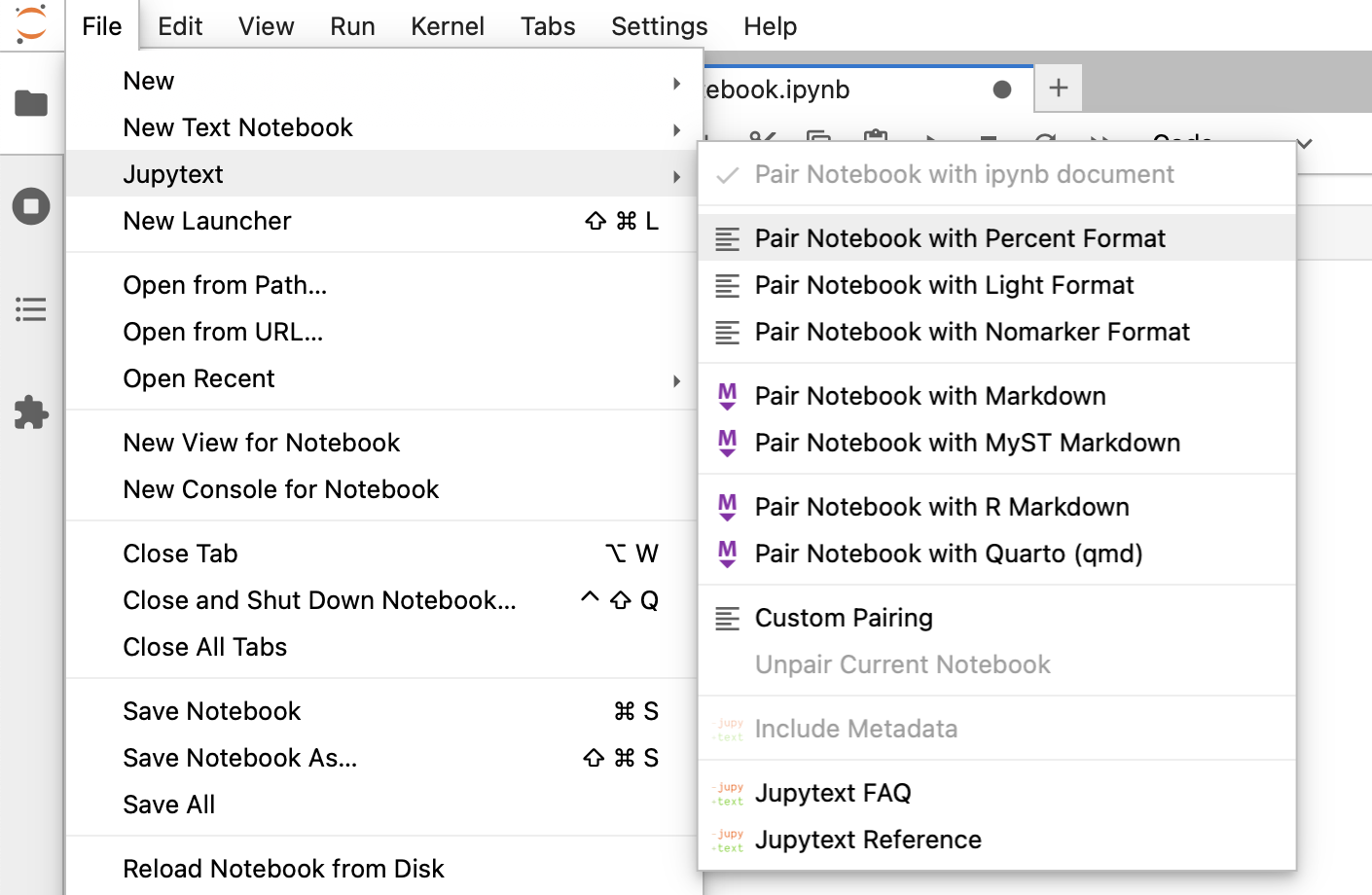
Pair all notebooks in the current and child folders with a jupytext.toml file containing e.g. formats="ipynb,py"
Creating text notebooks
Create text only notebooks with the New Text Notebook menu.

Open existing text notebooks with a right click1
Jupytext Stats
- Announced 6 years ago (MIT license)
- 30+ programming languages supported
- 98 contributors
- 6,874 GitHub stars
- 1.3M downloads/month on PyPI
Compatibility
Jupytext is compatible with the following stacks
- Jupyter Lab, Notebook, Hub etc.
- Jupyter Book and especially MyST Markdown
- VS Code:
# %%scripts, sync through plugin - Spyder, VIM (plugin), any editor
- Quarto (
.qmd) and RStudio (.Rmd), Pandoc - pre-commit framework, and more generally code QA tools
Jupytext: Text notebooks that you will love, by Marc Wouts. PyData London, June 8, 2025